Windows
Windows 10 / 11 · Launcher
The launcher installs the game, patches it automatically and keeps it up to date.
If one mirror is slow, use the other.
Free on Windows, macOS and Android. Pick your system — the game keeps itself up to date after you install.
Windows 10 / 11 · Launcher
The launcher installs the game, patches it automatically and keeps it up to date.
If one mirror is slow, use the other.
Android 7.0+ · v1.0.3 · ~140 KB
A light app: on first launch it downloads the game data (~890 MB) once and keeps it on your phone. After that it only downloads what changed, and the app updates itself.
For now the app is installed from our site, so Android shows a few safety prompts. This is temporary — the app is coming to Google Play.
Download the APK
Tap the button above. Your browser warns that this type of file can harm your device — confirm you want to download it anyway, then tap Open when it finishes.
Allow installs from your browser
Android opens “Install unknown apps”. Turn on Allow from this source for your browser (Chrome), then go back.
Tap Install
Confirm the installation. If you already have Supreme Destiny, the screen asks to install an update instead — tap Install all the same.
Google Play Protect: install without scanning
Play Protect says “App scan recommended”. Tap More details, then Install without scanning. Do not tap Scan app or Don’t install.
Confirm with fingerprint or screen lock
Some phones ask for your fingerprint, PIN or pattern to finish. That is your own phone lock — we never see it.
Open and play
Open Supreme Destiny on Wi-Fi. The first launch downloads the game data once; next time it opens straight in.
Apple Silicon & Intel · v0.1.0 · ~7.5 MB
Native Mac app with its own window and full-screen mode. It updates itself automatically.
For now macOS asks for a one-time approval on first launch. This is temporary — the app will soon be signed and open directly.
Drag to Applications
Open the .dmg and drag Supreme Destiny into your Applications folder.
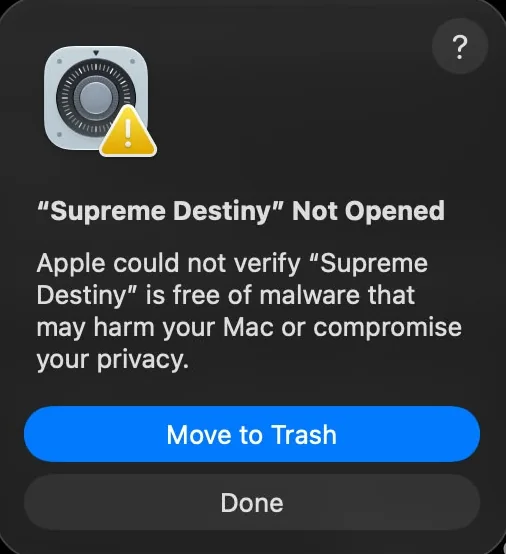
Open it — then click Done
macOS shows “Supreme Destiny” Not Opened. Click Done (not Move to Trash).
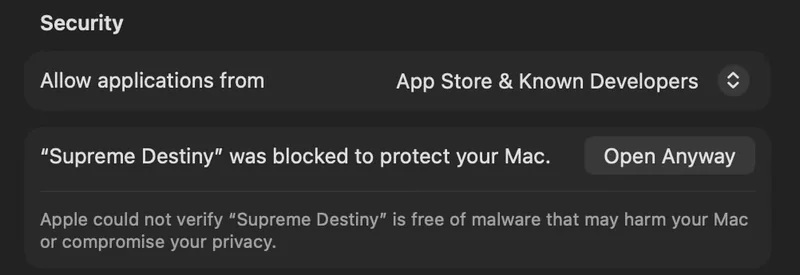
Approve it once
Go to System Settings › Privacy & Security, scroll to Security and click Open Anyway.
Done
From now on Supreme Destiny opens directly, like any other app.
iPhone & iPad
Supreme Destiny for iPhone and iPad is in the works. Follow the Discord to know the moment it opens.
Get notified on DiscordTrouble downloading or installing? Reach our support on Discord.
Download
Pick Windows, macOS or Android above.
Install
Windows: run the installer. Mac: drag the app into Applications. Android: follow the guide in its card.
Play
Updates install themselves — create your account, log in and play.
Any problem with the download or install? Reach our support on Discord:
Join the Discord